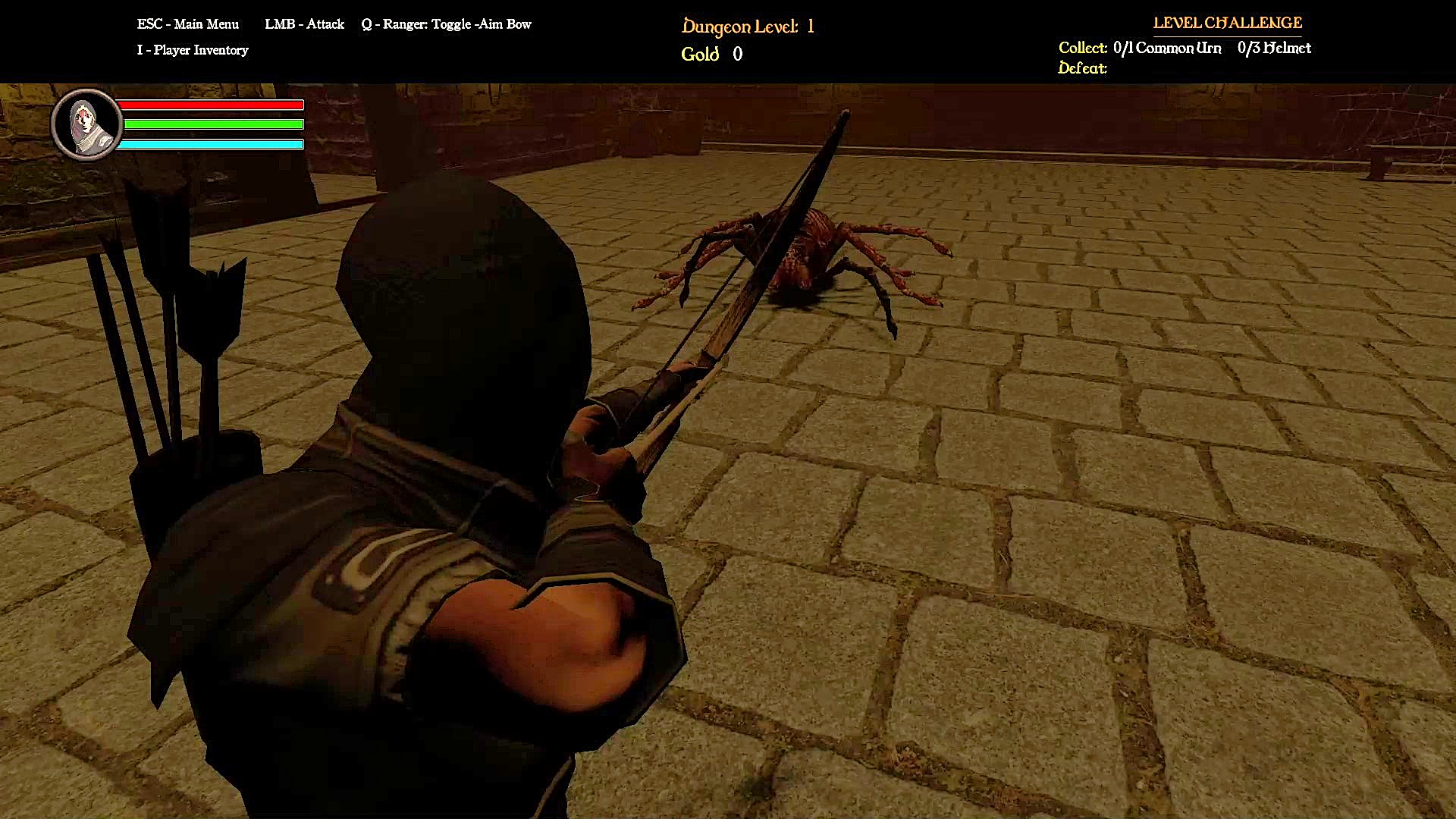
Welcome back to the labyrinth! In my last update, we looked under the hood at how I built Labyrinth’s core, inherited combat pipeline, stabilized our player physics, and integrated camera-relative movement. With those fundamental building blocks solid, Phase 4: Part 4 shifts our focus toward a critical aspect of software engineering: game feel and defensive programming.
When you develop a multi-class RPG as a solo engineer, it is easy for your scripts to become bloated as your player adds new mechanics. For this milestone, my goal was to introduce high-fidelity combat features for the Ranger class—including a 1st-person aiming toggle and a contextual close-quarters melee strike—while implementing smooth, frame-rate independent user interfaces and hardening our code against complex state failures.
Let’s step inside the development environment and explore how these systems were designed, optimized, and brought to life!
1. Dual-Stance Cinemachine Rigging & Orientation Locking
If you have ever played a third-person game, you know that aiming a ranged weapon like a bow can feel clunky. Because a 3rd-person camera sits far behind the character’s back, lining up a projectile with a distant target is incredibly difficult. To solve this, and to give players who love first-person gameplay a style they enjoy, I engineered a seamless dual-stance camera toggle system.

- The Setup: I integrated a secondary
aimCinemachinevirtual camera configured specifically as a first-person perspective alongside the player’s baseline 3rd-person exploration camera setup. This behavior is managed globally by the masterGameControllerand toggled locally by the player’s input controls. - The Execution: Instead of forcing the player to hold down an aiming button, pressing the Q key triggers a clean state toggle. When switching into the first-person stance, the script dynamically forces a camera priority swap, locks the character model’s forward rotation explicitly to the mouse crosshair vector (
forceFacingRotationLock = true), and aligns the viewport straight down the barrel of the arrow. The player can now aim with pinpoint precision, switching seamlessly from standard exploration to a dedicated first-person shooting layout.
2. Upper-Body Animation Blending with Avatar Masking
A common pitfall in 3D game development is “animation sliding.” This happens when a character freezes their legs in place to play an upper-body attack animation, making them look like they are floating or ice-skating across the floor. To ensure the Ranger could run, strafe, and dodge threats while actively tracking targets in their aiming viewpoint, I implemented Avatar Masking.
An Avatar Mask allows us to split a character’s 3D skeleton into isolated zones. I decoupled the Ranger’s animator controller into two distinct layers:
- The Base Layer: Handles lower-body locomotion variables (walking, running, and strafing).
- The Combat Layer: Uses an Avatar Mask that controls the skeleton from the waist up.
Because these layers are separated, Unity can blend two completely different animations at the exact same time. The Ranger can execute complex upper-body combat timelines (drawing a string, holding an arrow, and releasing projectiles) without interrupting the fluid movement of their legs across the dungeon floor.
3. Composition over Copy-Paste: The Contextual Melee Bow Strike
Good software engineering relies heavily on code reusability. I wanted the Ranger to have a close-quarters fallback attack—allowing the player to swing their physical bow to whack nearby monsters if they are ambushed.
To keep inputs simple and clean, this attack is contextual. If the player is in the standard 3rd-person exploration view and presses the normal attack key, they will execute a melee swing instead of firing an arrow. Rather than writing a brand-new damage pipeline from scratch, I used the object-oriented principle of composition and borrowed the robust, event-driven hitbox framework originally built for the Knight.

I attached a custom MeleeWeaponHitbox component directly to the 3D bow model. When the attack key is pressed while isBowStanceActive is evaluated as false, the system triggers the melee swing. Using frame-perfect Animation Events inside Unity, the engine handles the physics cleanup automatically:
OpenDamageWindow()activates the bow’s physical trigger collider precisely on the high-velocity frames of the swing.CloseDamageWindow()shuts down the collider and instantly clears the target tracking array so a single swing cannot accidentally damage an enemy twice.
4. Decoupling Visual Presentation: Interpolated UI Bars
To track health states across these high-stakes battles, I designed a reusable health bar tracking script called UIResourceBar.cs. Both our player characters and all underlying monster archetypes implement a shared IDamageable interface contract, making our combat data highly modular.
A frequent mistake in UI programming is tying the visual health slider directly to core health variables. This causes health bars to instantly chop or snap aggressively from full to empty when hit. To achieve a highly polished, arcade-quality feel, I decoupled the visual presentation from the raw data.
// Smooth frame-rate independent interpolation within UIResourceBar.cs
private void Update()
{
    if (visualHealthBar != null)
    {
        // Smoothly glide the visual fill amount toward the actual health value
        visualHealthBar.fillAmount = Mathf.Lerp(
            visualHealthBar.fillAmount,
            targetHealthPercentage,
            Time.deltaTime * interpolationSpeed
        );
    }
}
Instead of snapping, UIResourceBar.cs listens for damage updates and uses frame-rate independent linear interpolation (Mathf.Lerp driven by Time.deltaTime) to smoothly glide the visual slider to its new target value. This ensures that your health indicators remain silky smooth, even if the game’s frame-rate fluctuates mid-combat.
5. Defensive Edge-Case Engineering: Stance Reset Fail-Safes
One of the most complex challenges of designing a modular character framework is handling unexpected state combinations. During playtesting of Alpha Build 1.7.5, I discovered two critical bugs where the engine became trapped inside the Ranger’s first-person aiming mode:
- The Interactivity Lockup: If a player interacted with a safe-zone campfire selection menu or triggered a character swap while in the 1st-person aiming state, the camera remained locked in a first-person perspective, breaking the UI menus and freezing the active setups.
- The Player Defeat Camera Bug: If the player took fatal damage while in the 1st-person aiming camera stance, the level recovery loop would trigger while the engine was still trapped inside the combat camera’s high-priority setup. Upon reloading, characters would spawn with broken views and frozen movement.
To solve these bugs permanently, I turned to object-oriented encapsulation. Instead of forcing a massive master controller script to micromanage everything, I wrote a cleanup method inside the Ranger script:
C#
/// <summary>
/// Defensive cleanup method ensuring all active combat locks, camera overrides,
/// and model settings are fully removed before entering a new game state.
/// </summary>
public void DeactivateArcheryStance()
{
    isBowStanceActive = false;
    forceFacingRotationLock = false;

    // Restore cinemachine camera priorities back to the exploration 3rd person camera
    if (aimCinemachineCamera != null) aimCinemachineCamera.Priority = 0;

    // Reset animator parameters to prevent state stagnation
    characterAnimator.SetFloat("AimWeight", 0f);

    // Clean up active prop visual instances or projectile handles
    ClearActiveVisualProps();
}
Now, when a player opens a campfire menu, the UI automatically fires this method to safely unwind the camera overrides.
Even better, I integrated this fix directly into the player’s core life cycle inside PlayerHealth.cs. When the player’s health drops to zero, ExecuteDeathSequence() runs a quick check:
// Inside PlayerHealth.cs -> ExecuteDeathSequence()
// BUG FIX: Force Ranger camera stance reset back to 3rd-person BEFORE level reload triggers
RangerPlayer rangerScript = GetComponent<RangerPlayer>() ?? GetComponentInChildren<RangerPlayer>();
if (rangerScript != null)
{
    // Safely exit the Cinemachine 1st-person override and orientation locks
    rangerScript.DeactivateArcheryStance();
}
By placing this right inside the death sequence, the character takes responsibility for clearing its own camera priority overrides before the script calls GameController.Instance.LoadSavedGame(). Cinemachine smoothly passes focus back to the baseline 3rd-person exploration camera, completely preventing data corruption on respawn.
Next Time: Expanding Combat Feedback & Enemy Intelligence
With dual-stance camera shifting, smooth UI rendering, and defensive state cleanup loops operating flawlessly, the foundational sandbox of Labyrinth feels incredibly responsive and reliable. Now it’s time to make combat feel more impactful and reactive!
Get ready for Dev Log #11: Phase 4: Part 5 – Hit Reactions, Tactical AI Evasion, and Mortality Sequences! In our next major architectural update, we will break down:
- Dynamic Hit Reactions: Programming an animation-interception system that triggers visual “flinch” states using Animator parameters, giving players satisfying physical feedback whenever a strike connects.
- Reactive AI State Switching: Upgrading our enemy Finite State Machines so that monsters dynamically switch behaviors upon taking damage—allowing them to intelligently retreat or reposition to avoid getting hit again.
- Polished Mortality Sequences: Implementing dedicated, asynchronous death animations for both players and enemies, replacing instant data-clearing with a smooth, high-fidelity visual end state.
The deep layers of the dungeon are waiting. Head over to my itch.io page to download the latest alpha sandbox build, test out the new camera controls, and drop your layout bugs or feedback in the comments section. Let’s look under the hood together—see you in the next update!