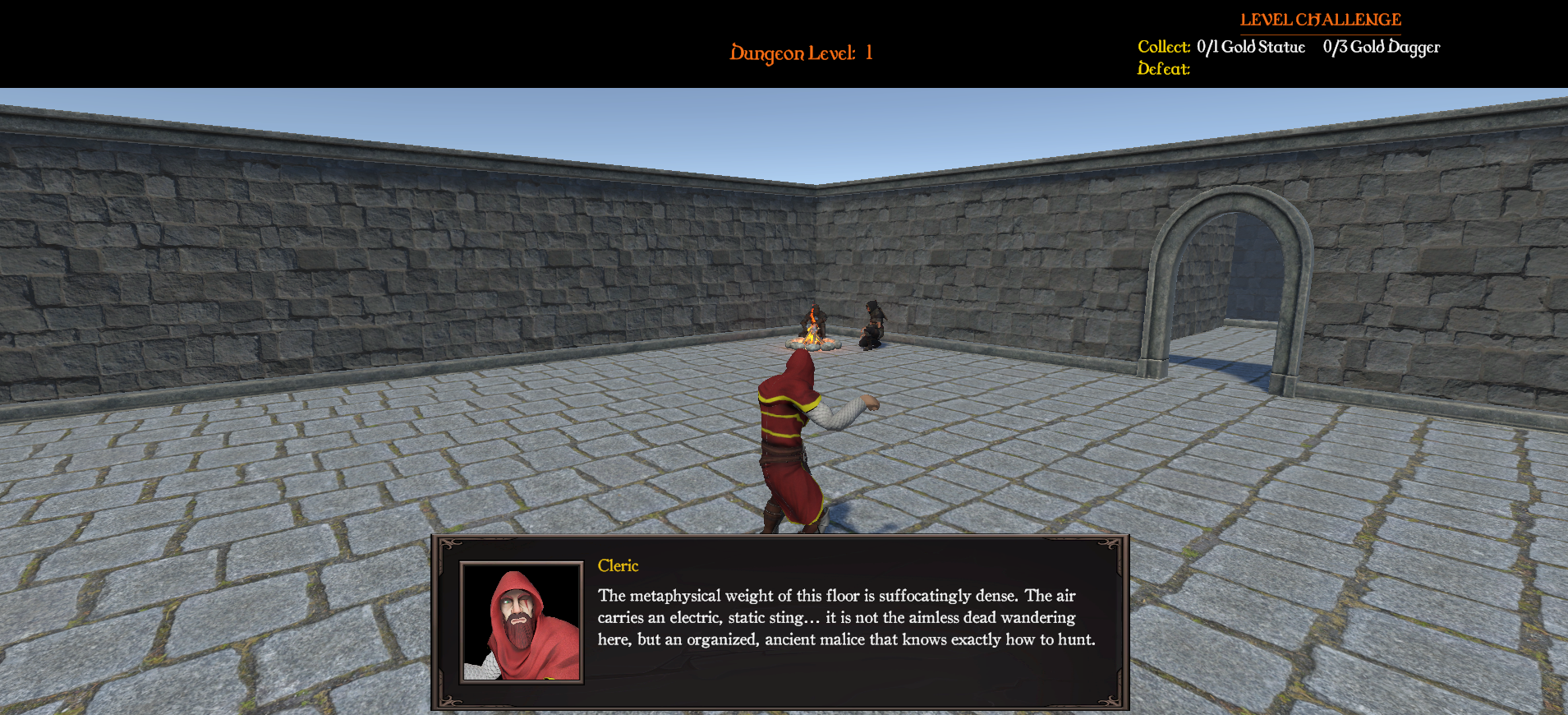
At this stage of development, I have successfully taken abstract numbers and mechanical character swapping and turned them into an immersive, story-driven experience. By building a data-driven Character Dialogue & Portrait UI System, each hero class now has a distinct voice, a unique tactical mindset, and a personality that directly changes how the player approaches the dungeon’s survival and stealth mechanics.
Core Architecture & Narrative Design
- The Tactical Database (CharacterDialogueData): Instead of writing generic text boxes, each character profile (like Knight_Dialogue, Ranger_Dialogue, or Cleric_Dialogue) acts as an independent behavioral script. This allows us to inject deep lore and unique personality traits directly through the Unity Inspector without touching core code.
- Contextual Awareness (DialogueContext): The dialogue system is highly dynamic, reacting directly to the state of the world to reinforce gameplay strategies:
- Spawn & Campfire: Sets the mood and current objective whenever the player enters a new floor or switches heroes at a camp hearth.
- LowHealth & LowFood: Replaces standard flashing UI health bars with immersive, personal voice lines that reflect how that specific character handles danger and survival.
Character Personalities & Gameplay Focus
The system highlights a stark contrast in player choices, presenting three completely different playstyles and strategic mindsets through text, art, and environmental interaction:
The Ranger: Stealth, Strategy, and Awareness
The Ranger’s lines are quick, sharp, and deeply calculating. The dialogue actively teaches the player to treat the dungeon like a physical tactical puzzle, reinforcing mechanics like line-of-sight, sound propagation, and terrain advantages.
- The Gameplay Vibe: Patient, cautious, and methodical.
- Key Dialogue Highlight: “Stick to the pillar shadows. Gauge the room’s echo before we move in.”
The Knight: Frontline Discipline, Power, and Order
In stark contrast, the Knight sounds heavy, proud, and bound by duty. The lines reflect an unyielding wall of defense, encouraging the player to lead from the front, manage shields, and hold tight tactical formations in narrow dungeon corridors.
- The Gameplay Vibe: Confrontational, authoritative, and structured.
- Key Dialogue Highlight: “Enough time resting, let’s get moving! Form up behind my shield.”
The Cleric: Spiritual Sensitivity and Metaphysical Perception
The Cleric acts as the party’s sentinel, operating on an entirely different frequency than the others. While the Ranger looks at the floor for physical traps, the Cleric looks at the air—tracking shifts in temperature, feeling psychic static, and mapping invisible currents of energy. His lines emphasize the lingering entities and emotional weight soaked into the very stone of the dungeon.
- The Gameplay Vibe: Mystical, hyper-vigilant, and supernaturally aware.
- Key Dialogue Highlight: “The air grows cold here… a lingering malice clings to these stones. Watch your step.”
The Technical Journey: Fixing UI Timing and Bugs
Building a UI system that relies heavily on data assets often reveals hidden script interaction problems in Unity. My development process focused on transforming a system vulnerable to timing locks into a completely reliable, self-correcting UI pipeline.
Step 1: Diagnosing the “Silent Failure”
- The Symptom: Dialogue worked perfectly when starting a brand-new game. However, when loading a saved session, the UI panel remained completely invisible, and no error messages appeared in the console.
- The Root Cause: I discovered two hidden culprits:
- Time-Scale Locking: When loading a game or opening save menus, the engine pauses the game world using Time.timeScale = 0;. The dialogue text animation loop was using standard WaitForSeconds(), which relies on the game world clock. Because time was frozen, the code was trapped waiting forever on its very first frame.
- Missing Data Safety Gates: If a character type was missing lines in a specific category, the script executed a quiet return; command before ever making the UI panel visible or unlocking player inputs, causing the system to freeze up.
Step 2: Unlocking the Timing Timeline
To fix the freeze, I replaced the time-dependent waits with WaitForSecondsRealtime(). This completely detached the dialogue UI animations from Unity’s game-world clock. Now, introductory dialogue barks can cleanly animate and disappear even if the rest of the game world is completely frozen behind a loading screen.
Step 3: Designing Graceful Fallbacks
Rather than allowing empty text lists to silently break the game or trap player controls, I built an automated safety fallback system. If a developer forgets to add text lines during testing, the dialogue panel still animates onto the screen safely and types out a placeholder string: “… (Silence) …”.
This guarantees two things:
- The input management code (PlayerInput.ActivateInput()) always finishes its loop, preventing the game from freezing up (soft-locking).
- The developer gets an immediate visual notification on screen letting them know exactly which character profile needs text content.
Step 4: Expanding Contexts & Dynamic Portraits
With a stable core engine, I expanded the features:
- I connected the custom Campfire dialogue context cleanly into our hearth interaction code.
- I implemented a portrait array system. When the UI draws the dialogue box, it automatically switches out the character sprite image using an array index based on the currently active character type.
- I hooked up the custom
Campfirecontext, binding it cleanly into the hearth interaction sequence. - I implemented an Avatar/Portrait Array, ensuring that when the UI panel draws, it switches out image sprites based on the active
CharacterTypeenum index.
- I hooked up the custom
Technical Skills Demonstrated
Data-Driven UI Architecture: Utilizing ScriptableObject configurations to completely separate narrative text files and dialogue databases from the core presentation and layout code.
Engine Timing & Asynchronous Lifecycles: Mastering Unity’s runtime timelines by using WaitForSecondsRealtime() to isolate user interface animations from state pauses, scene transitions, and frozen game clocks.
Defensive Programming: Designing self-correcting fallback logic within text-typing loops to ensure that missing data files during testing never break control configurations or freeze player input.
UI/UX State Synchronization: Engineering dynamic runtime array lookups to instantly match visual interface graphics with real-time character swaps, keeping the visuals and story perfectly aligned.
What’s Next?
With Phase 3 completely finalized, our procedural world now has both structural stability and a distinct narrative personality. Our dungeon layouts are predictable, our item states save correctly, and our heroes dynamically react to the dangers around them.
Get ready for Phase 4: Advanced Combat & The Death Loop! In our next log, we will shift away from interfaces and dive straight into high-stakes gameplay mechanics. We will explore how to build:
- Unified Damage Logic: Creating a clean, decoupled IDamageable interface pattern so that player attacks, environmental traps, and breakable barrels all share the exact same interaction language.
- Class Combat Implementation: Finishing unique combat mechanics for our roster—building heavy physics-driven melee strikes for the Knight, projectile trajectory physics for the Ranger, and channeled magical energy calculations for the Cleric.
- The Revenge System: Implementing an “Elite Modifier” system to dynamically scale up enemy difficulty, paired with a permanent “Death Chest” retrieval mechanic to make dying an interesting strategic hurdle rather than a simple game over screen.
Next Time: We jump out of the menus and straight into the combat calculations. Stay tuned!