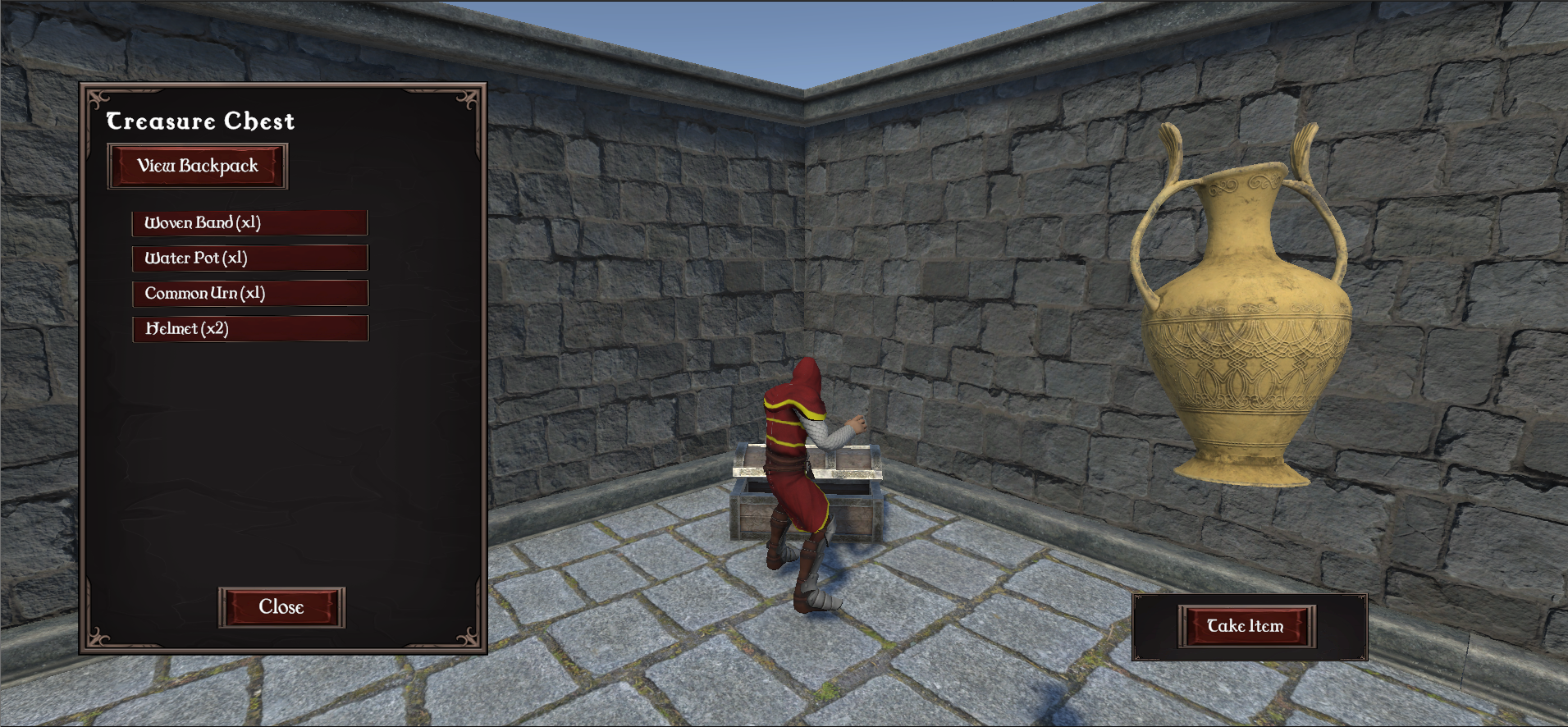
In our last few logs, I built a procedural generation engine that can create over 285 trillion unique dungeon layouts, and I set up our basic saving system. But a world without things to interact with is just an empty maze.
Phase 3 is all about turning this raw geometry into a fun, working game world. In this post, we will look at how to place items predictably using a seed, how to make the game remember if an object has been interacted with, and how to create a reliable, step-by-step loading pipeline.
Predictive Placement & Creating “Safe Zones”
To make a game highly replayable, the world needs to feel organic and natural, but the code underneath still needs to be completely predictable.
- The Seeded Item Pipeline: I connected our pathway generator (MazeIDGenerator) and our mesh framework (DungeonCreator) so they can handle rooms with multiple layouts. By using our global world seed to calculate random values inside RoomController.cs, we ensure that every table, barrel, chair, and treasure chest spawns in the exact same spot every time a player uses that specific seed.
- The Campfire Protection Zone: A common problem in procedural generation is random furniture spawning right on top of important interactive items. To solve this, I added a distance check inside RoomController.cs. The code measures the exact distance from a potential furniture spawn point to the campfire save point. If the spawn point is too close, the game cancels the spawn. This leaves a clean “Safe Zone” around the campfire so players can always access it easily.
Spawning Rule: Furniture prefabs are spawned in room corners with slight offsets. Because campfires are highly important, they take priority. The RoomController.cs script always checks if a campfire is already using a corner before trying to place a regular piece of furniture there.

Tracking Objects and Keeping World Consistency
When a player reloads a randomly generated level, we need to make sure the game doesn’t accidentally spawn duplicate items or reset chests that the player has already looted.
- The Coordinate Identity System: To avoid tracking every single item in a massive database, I made RoomController.cs name objects dynamically based on where they sit in the world. For example, a chest sitting at X: 150, Z: 300 is automatically given the ID string “Chest_X150_Z300”.
- The Loot Validation Check: When a chest spawns, a script called TreasureChest.cs runs a quick check against the game’s global save file. If the save file shows that this specific chest ID was already opened, the chest overrides its default settings. It forces itself open, empties its original loot, and displays whatever items the player left inside it. This keeps the world consistent and stops players from exploiting duplicate loot.
The Code: From Math to Spawning and Saving
The C# code below shows how RoomController.cs handles this entire process. It calculates 3D positions in memory, checks for campfire safety, spawns the asset, and creates a unique coordinate-based ID for our JSON save system.
  C#
// Inside RoomController.cs - Processing spatial offsets and proximity checks prior to asset commitment

Vector3 finalCalculatedPosition = rawCornerPosition;

// 1. Resolve Prefab-Specific Bounds Offsets
if (selectedPrefab.TryGetComponent(out FurnitureOffset offsetData))
{
    // Translate the hand-authored 2D vector (distance from room corner x offset left or right) adjustments into a 3D local vector space
    Vector3 localSpaceOffset = new Vector3(offsetData.cornerOffset.x, roomFloorHeight, offsetData.cornerOffset.y);

    // Multiply the predicted rotation Quaternion by the local offset vector.
    // This mathematically sets the GameObject.TransformDirection()
    // entirely in memory, eliminating the performance cost of spawning a live scene object first.
    Vector3 worldSpaceOffset = predictedRotation * localSpaceOffset;

    // Apply the transformed spatial offset to our target destination
    finalCalculatedPosition += worldSpaceOffset;
}

// 2. Inject Micro-Variations to Break Visual Grid Uniformity ("Organic Wiggle")
Vector3 organicWiggle = new Vector3(Random.Range(-0.1f, 0.1f), 0f, Random.Range(-0.1f, 0.1f));
finalCalculatedPosition += organicWiggle;

// 3. Campfire Protection Zone
// Validation Check: We evaluate the distance using the FINAL calculated coordinates,
// rather than the raw wall corner, preventing shifted props from bleeding into the safe zone.
float distanceToCampfire = Vector3.Distance(finalCalculatedPosition, campfireWorldPosition);
const float CAMPFIRE_SAFE_ZONE_RADIUS = 3.2f; // Tuned upward to accommodate wide mesh bounding boxes

if (distanceToCampfire < CAMPFIRE_SAFE_ZONE_RADIUS)
{
    Debug.LogWarning($"[Dungeon Builder] Aborted instantiation of '{selectedPrefab.name}' to protect Campfire interaction layout.");
    continue; // Safely skip this loop iteration to prevent physical object overlap
}

// 4. Secure Asset Commitment
// The calculated transforms have passed all safety validation gates; commit to instantiation.
GameObject spawnedProp = Instantiate(selectedPrefab, finalCalculatedPosition, predictedRotation, this.transform);

if (isChest)
{
    spawnedProp.name = "TreasureChest_Procedural_Corner";

    if (spawnedProp.TryGetComponent(out TreasureChest chestScript))
    {
        // Persistance Architecture: Generate a completely unique runtime identifier
        // by generating the room's global world-space coordinates directly into a string key.
        // This effectively isolates separate chests spawned within the same room, ensuring
        // the JSON save/load pipeline addresses the exact container instance (e.g., "Chest_X150_Z300").
        string uniqueChestID = $"Chest_X{(int)transform.position.x}_Z{(int)transform.position.z}";
        chestScript.chestID = uniqueChestID;
    }
}
else
{
    // Clean hierarchy naming convention for standard non-interactive environmental props
    spawnedProp.name = $"Furniture_{selectedPrefab.name}_Corner";
}
Smart Databases & Event-Driven Systems
To keep our save files small and fast, we avoid writing massive amounts of data (like full 3D models or heavy scripts) into text files. Instead, I use a smart reference system.
- The String Database Pattern: Interactive items (ItemData ScriptableObjects) and quest goals (ChallengeGoal) use simple text IDs (itemID). When loading a save file, the game engine reads these short text IDs and asks InventoryManager.Instance.GetItemByID() to quickly find and load the actual asset from memory.
- Event-Driven Quest Tracking: To keep the game running smoothly, I turned ChallengeGoal from a rigid struct into a flexible class with a progress counter. I then connected a progress tracker (RecalculateChallengeProgress()) directly to the Inventory UI.
Instead of forcing the game to constantly run an expensive loop checking your inventory every single frame, this event-driven setup triggers an automated item check the exact millisecond your inventory changes.
The Code: High-Performance Asset Finding
The code below shows how InventoryManager.cs looks up assets using a dictionary cache. By loading our list of items into a key-value dictionary at startup, the system can find any item instantly by its text ID, preventing game lag.
C#
// Inside InventoryManager.cs - Data-Driven ScriptableObject Asset Registry Lookup

[Header("Item Database")]
// Populated in the Unity Editor with static ScriptableObject prefab assets
[SerializeField] private List<ItemData> masterItemDatabase = new List<ItemData>();

// High-performance cache table utilized to bypass expensive List.Find() loops at runtime
private Dictionary<string, ItemData> itemLookupTable = new Dictionary<string, ItemData>();

private void Awake()
{
    // Populate the dictionary cache at application boot time
    InitializeLookupTable();
}

/// Generates standard List elements into a fast-lookup Dictionary registry.
private void InitializeLookupTable()
{
    itemLookupTable.Clear();

    foreach (ItemData item in masterItemDatabase)
    {
        if (item != null && !string.IsNullOrEmpty(item.itemID))
        {
            // Defensive check to ensure identification hashes remain strictly unique
            if (!itemLookupTable.ContainsKey(item.itemID))
            {
                itemLookupTable.Add(item.itemID, item);
            }
            else
            {
                Debug.LogWarning($"[Inventory Manager] Duplicate asset itemID detected: {item.itemID}");
            }
        }
    }
}

/// Resolves a static ScriptableObject data asset link using an O(1) text identifier key.
public ItemData GetItemByID(string id)
{
    // Resolves asset pointers instantaneously in constant time,
    // ensuring large-scale item tables or rapid UI rebuilds never cause CPU-bound frame lag.
    if (itemLookupTable.TryGetValue(id, out ItemData matchedAsset))
    {
        return matchedAsset;
    }

    Debug.LogWarning($"[Database] Item ID '{id}' could not be resolved in the O(1) registry cache.");
    return null;
}
Organizing the Load Sequence to Stop Stuttering
Turning complex mechanics into a smooth player experience required restructuring exactly when the game engine reads save files.
- Eliminating Frame Stutter: I moved the loading system out of the continuous Update() loop in GameController.cs and attached it directly to a dedicated “Load Game” UI button managed by MenuManager.cs. This prevents the game from accidentally reading files multiple times or stuttering while a player holds down a key.
- The Step-by-Step Loading Stack: To prevent order-of-execution bugs (where scripts accidentally break because they load before the things they rely on are ready), I set up a strict step-by-step loading order inside LoadSavedGame():
[Main Menu Trigger]
 1. Wipe Old Scene Hierarchy Geometry
 2. Rebuild Layout Variables (Seed & Floor Number)
 3. Instantiate New Dungeon Prefabs
 4. Spawn Active Player Model Prefab
 5. Shift Coordinates with Physics Overrule (CharacterController Bypass)
 6. Inject Player Inventory Stacks into the Shared Bag Array
 7. Fire Final Challenge Recount & Reset Cursor Lock Modes
By placing the inventory restoration and quest updates at the very end of the sequence, we guarantee that the world geometry and player character are fully loaded and stable before we try to hand them any data. This gives us a seamless, bug-free transition from the main menu straight back into the action.
.
Technical Skills Demonstrated
- Deterministic Generation: Learned how to link multiple random generation loops to a single global seed string for predictable results.
- Data Preservation & Optimization: Used lightweight text IDs and dictionaries instead of heavy files to track changes in the world.
- Event-Driven Programming: Created decoupled systems where the UI and managers communicate only when something changes, saving processing power.
- Execution Order Management: Set up a strict script loading order to prevent race conditions and initialization errors.
With Phase 3 complete, our procedural engine isn’t just generating random shapes anymore—it is managing an active, persistent ecosystem. This marks the completion of the core architectural systems!
Next Time: In the second half of Phase 3, we will jump into Contextual Dialogue & Character Personality! We will explore how to build an event-driven UI notification system, create dynamic NPC lines, and make on-screen dialogue react to a player’s class, current quests, and items. Stay tuned!