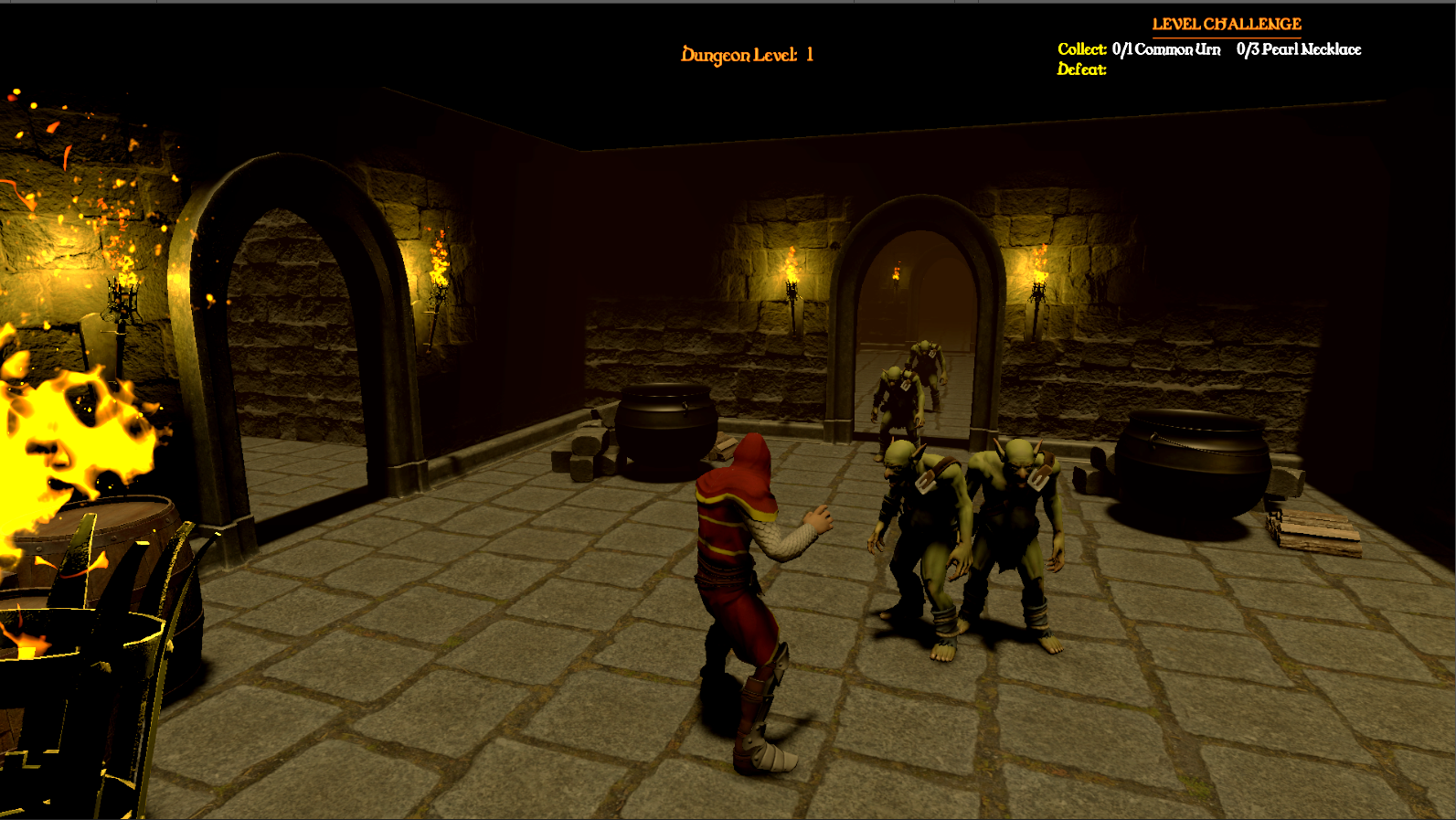
In our last update, we looked at how individual creatures think by breaking down our modular Enemy AI State Machine and movement systems. However, a smart brain doesn’t mean much if monsters just pop into existence randomly across the map. To turn Project Labyrinth’s randomly generated halls into a believable underworld, we need a bigger system that decides where, when, and how efficiently these threats appear.
Phase 4 (Part 2) shifts our focus from small AI settings to big-picture layout planning and memory optimization. In this post, we will look at how to build a data-driven territory ecosystem, how to use hidden trigger boundaries to save computer processing power, how to eliminate game lag using an automated Object Pooling framework, and how to use clever layout and fog rules to keep players immersed in the tension.
Data-Driven Zoning: The Territory System
To keep the gameplay logic flexible and easy to change, my spawning setup avoids hardcoding lists of monsters into our room templates. Instead, I pull all that information out into separate configuration assets called EnemyTerritoryData ScriptableObjects (like UndeadTerritory or BruteTerritory).
These lightweight data blocks track three simple things:
- The Ecosystem Table: A list of theme-appropriate enemy prefabs that belong together (e.g., skeletons and ghosts in an undead zone).
- Density Caps: Minimum and maximum rules to control exactly how many enemies can spawn in a single room volume.
- Thematic Props: Custom lists of furniture and decorations that match that specific territory’s visual style.
When the main generation engine (DungeonCreator) runs, it builds the physical rooms and links a territory asset straight to each space using a function called InitializeRoomSpawning(EnemyTerritoryData territory). Because this setup works entirely as a text-and-number checklist, it assigns values without actually spawning anything yet, keeping memory usage at absolute zero during the initial map creation.

Memory Optimization: The SpawnPoolManager Framework
Constantly creating (Instantiate()) and deleting (Destroy()) complex AI monsters with lots of scripts as the player runs through a dungeon is a classic recipe for severe CPU lag. Creating memory on the fly splits up system memory, while deleting items forces Unity’s “Garbage Collector” to hunt through files, causing noticeable frame drops and stuttering.
To fix this, Project Labyrinth manages the life and death of every enemy using an optimized memory recycling method called an Object Pooling System, controlled by a script named SpawnPoolManager.

The Object Pooling Script
The C# code below shows how our SpawnPoolManager.cs handles this recycling process. It loads assets upfront behind a loading screen, hides them, and safely passes them to the game world when requested.
C#
using System.Collections.Generic;
using UnityEngine;

/// <summary>
/// The SpawnPoolManager acts as a smart memory recycling system.
/// Instead of constantly creating and destroying game objects at runtime—which causes game stutter
/// and lag spikes—this script pre-loads objects, hides them when they aren't needed, and reuse them on demand.
/// </summary>
public class SpawnPoolManager : MonoBehaviour
{
    // Singleton Pattern: Makes this script globally accessible from anywhere in your project's code.
    public static SpawnPoolManager Instance { get; private set; }

    // Storage Caches:
    // poolDictionary: Grouping inactive objects by their Prefab ID, waiting in a line (Queue) to be reused.
    private Dictionary<int, Queue<GameObject>> poolDictionary = new Dictionary<int, Queue<GameObject>>();

    // activeInstanceToPrefabMap: The tracking system
    // Live objects don't naturally know which Prefab created them.
    // This map links each live object's ID back to its master Prefab ID,
    // eliminating expensive search loops and letting us return it to the
    // correct storage queue instantly when it despawns.
    private Dictionary<int, int> activeInstanceToPrefabMap = new Dictionary<int, int>();


    [System.Serializable]
    public struct PrePoolConfiguration
    {
        public GameObject prefab;         // The enemy or object prefab (e.g., Skeleton Enemy, Wall Torch)
        public int preAllocationCount;    // How many copies to load into memory upfront
    }

    [Header("Warm-Up Configurations")]
    [SerializeField] private List<PrePoolConfiguration> warmUpPools = new List<PrePoolConfiguration>();

    private void Awake()
    {
        // Enforces that only one manager can exist at a time (Singleton Rule)
        if (Instance == null)
        {
            Instance = this;
            DontDestroyOnLoad(gameObject); // Keeps this manager alive when transitioning between different loading screens/scenes
            InitializeWarmUpPools();       // Instantly warm up the memory arrays
        }
        else
        {
            Destroy(gameObject); // Safely self-destructs duplicate managers to protect memory integrity
        }
    }

    //  Pre-allocates objects during initialization to completely eliminate performance hiccups mid-game.
    // This handles the heavy lifting while the player is safely sitting behind a loading screen.
    private void InitializeWarmUpPools()
    {
        foreach (var config in warmUpPools)
        {
            if (config.prefab == null) continue;

            int prefabID = config.prefab.GetInstanceID();

            // If we haven't created a storage shelf for this specific prefab yet, create one now
            if (!poolDictionary.ContainsKey(prefabID))
            {
                poolDictionary[prefabID] = new Queue<GameObject>();
            }

            // Generate the exact number of objects requested, hide them, and tuck them into the storage queue
            for (int i = 0; i < config.preAllocationCount; i++)
            {
                GameObject instance = Instantiate(config.prefab, transform);
                instance.SetActive(false); // Keeps them asleep so they don't consume CPU logic or processing power
                poolDictionary[prefabID].Enqueue(instance);
            }
        }
    }

    // Bypasses native instantiation by pulling an optimized game object out of storage,
    // or scaling the container size upwards if the current pool runs completely empty.
    public GameObject Spawn(GameObject prefab, Vector3 position, Quaternion rotation, Transform parent = null)
    {
        if (prefab == null)
        {
            Debug.LogError("[POOLING] Attempted to spawn a null prefab reference.");
            return null;
        }

        int prefabID = prefab.GetInstanceID();

        // Safety Net: If a designer asks for an unpooled prefab on the fly, dynamically build a new shelf for it
        if (!poolDictionary.ContainsKey(prefabID))
        {
            poolDictionary[prefabID] = new Queue<GameObject>();
        }

        GameObject spawnInstance = null;

        // DECISION LOOP: Pull a hidden object out of the pool, or create a new one if demands are high
        if (poolDictionary[prefabID].Count > 0)
        {
            // An item is available! Pull it from the line
            spawnInstance = poolDictionary[prefabID].Dequeue();
        }
        else
        {
            // Emergency Fallback: The queue is empty because there are too many active objects on screen.
            // Allocate one brand-new instance to dynamically expand our baseline capacity.
            spawnInstance = Instantiate(prefab);
        }

        // Teleport the object into its correct spatial world coordinates and attach it to its layout parent
        spawnInstance.transform.SetPositionAndRotation(position, rotation);
        spawnInstance.transform.SetParent(parent);

        // Tag this specific object instance with its master prefab ID so we can track it down later
        int instanceID = spawnInstance.GetInstanceID();
        activeInstanceToPrefabMap[instanceID] = prefabID;

        // Wake the object up visually and physically in the active scene
        spawnInstance.SetActive(true);

        // STATE INJECTION / CLEANSING: Find any components attached to this object that use the 'IPoolable' interface,
        // and tell them to run their setup tasks (like resetting enemy health to full or wiping historical AI memory).
        IPoolable[] poolables = spawnInstance.GetComponentsInChildren<IPoolable>(true);
        for (int i = 0; i < poolables.Length; i++)
        {
            poolables[i].OnSpawn();
        }

        return spawnInstance;
    }

    // Intercepts object destruction. Instead of deleting the entity entirely and fragmenting the heap,
    // it resets the object, puts it to sleep, and puts it back into stagnant storage arrays.
    public void Despawn(GameObject instance)
    {
        if (instance == null) return;

        int instanceID = instance.GetInstanceID();

        // Safety Check: Verify if this object was actually generated by the pooling manager.
        // If someone accidentally passes a completely standard object here, handle it safely by standard deletion.
        if (!activeInstanceToPrefabMap.TryGetValue(instanceID, out int prefabID))
        {
            Debug.LogWarning($"[POOLING] GameObject '{instance.name}' was not created via SpawnPoolManager. Destroying natively.");
            Destroy(instance);
            return;
        }

        // RECOVERY LOOP: Find all components implementing 'IPoolable' and command them to clean up after themselves
        // (like stopping physics velocity vectors, halting AI brains, or clearing visual particles).
        IPoolable[] poolables = instance.GetComponentsInChildren<IPoolable>(true);
        for (int i = 0; i < poolables.Length; i++)
        {
            poolables[i].OnDespawn();
        }

        // Deactivate the asset so it disappears from player view and stops running real-time engine processing loops
        instance.SetActive(false);
        instance.transform.SetParent(transform); // Re-nest it underneath the manager to keep the scene hierarchy perfectly clean

        // Erase the tracking tag and put the recycled instance back onto the shelf for future usage
        activeInstanceToPrefabMap.Remove(instanceID);
        poolDictionary[prefabID].Enqueue(instance);
    }
}
How Recycling Works in Practice
Instead of allocation spikes happening whenever a player opens a new doorway, character assets are treated as permanent, reusable structures.
- The Spawning Pipeline: When a room requests a monster, it completely skips Unity’s basic Instantiate method. The SpawnPoolManager checks its storage lines using the requested prefab as a key. If a hidden enemy is waiting, it gets pulled out, teleported to its spawn coordinates, and woken up using SetActive(true).
- Scrubbing Old Data Clean: Because recycled objects remember values from their previous lives, a strict cleanup routine runs upon reactivation. The enemy stats script resets health back to maximum using fresh configuration settings, the navigation agent safely snaps its physical transform onto the walkable ground mesh, and the AI brain receives a fresh variable assigning its new home room destination.
- The Fake Death Sequence: When an enemy’s health drops to zero, the game halts the traditional death process. Instead of deleting the object, it is removed from the active room list. The monster’s movement speed is instantly set to zero, its AI brain is put to sleep, its model is hidden with SetActive(false), and it is quietly handed back to the SpawnPoolManager shelf—ready to be cleanly deployed into the very next hallway the player explores.
Proximity Spawning Trigger Nets
To spread out computer processing costs over the course of a player’s entire run, the game loop uses an on-demand, event-driven cycle at runtime. Every procedurally placed room functions as an enclosed cell controlled by a hidden collision box trigger.
- The Trigger Gate: Rooms remain completely asleep and empty until a physics body tagged as “Player” steps inside the room’s perimeter box, firing Unity’s native OnTriggerEnter function.
- Anti-Spam Flags: To avoid performance stutters or duplicate enemy spawning if a player repeatedly steps backwards and forwards across a room’s threshold line, strict conditional flags (hasSpawned, isCleared) act as logical gatekeepers.
- Instant Materialization: The exact millisecond the player trips the room trigger, the room cell wakes up, reads the rules of its pre-assigned EnemyTerritoryData asset, calculates a target enemy count using a random range, and requests ready-to-use monsters directly from our pooling system.
Hiding Spawns for Better Visual Immersion
To protect player immersion and eliminate immersion-breaking moments where monsters materialize right out of thin air in front of the camera, I implemented strict positioning rules:
- Density Limiting Math: Upon activation, the spawning routine loops through a localized list of physical spawn points built into the room’s art prefab. It uses a basic clamping function (Mathf.Min(targetCount, enemySpawnPoints.Length)) to make sure the game never tries to force more monsters into a room than physical anchor points allow, protecting the navigation grid from messy clipping bugs.
- Out-of-Sight Placement Rules: Inside the Unity editor, spawn points are intentionally placed far away from open doorways, threshold thresholds, or forward-facing camera paths. They are nestled deeply inside dark alcoves, hidden behind large supporting stone pillars, or placed around blind corners. This layout rule ensures that when a player steps into a room, enemies appear out of sight, preventing jarring asset popping.
- Campfire and Safe Zones: While dangerous corridors keep tension high, our spawning system must safely accommodate resting zones and safe havens. If a room receives territory data labeled as “Campfire”, the proximity manager immediately triggers an early code exit, completely canceling enemy spawning to place recovery structures and friendly merchants instead. Similarly, the system tracks the final room of the dungeon floor, forcefully overwriting it with a hardcoded safeZoneTerritory profile so players can safely interact with the exit portal without combat interruption.
Lighting Filters & Hard Distance Fog
To reinforce the visual trick of hidden spawn zones, I combined environmental lighting filters with hard-clipped distance fog. This aesthetic choice prevents players from looking deep into un-triggered rooms down the map while ensuring great visual clarity within their immediate surroundings.
- Dust-Tinted Lighting: Instead of turning off global lights completely, the scene’s primary directional light remains active but is shifted to a muted, dark brown color profile. This serves two purposes: it ensures players can clearly see combat cues inside their active room, while beautifully simulating a heavy, dust-choked underground atmosphere.
- Hard-Clipped Distance Fog: To stop players from peering down long corridors or previewing un-triggered room tiles through open doorways, a dense atmospheric fog is tied to our rendering settings. I calibrated this fog with a strict cutoff that completely blocks visibility past 15 units. Any world geometry, un-triggered rooms, or wandering monsters past this 15-unit threshold become entirely invisible, preserving exploration mystery.
- Localized Torch Network: To break up the uniform ambient dust profile, high-contrast, wall-mounted torch light fixtures are placed along corridors and room walls. Throwing flickering point lights against the stonework creates moving shadows, completely locking in that classic, tense dungeon crawl atmosphere.

Technical Skills Demonstrated
- Memory Management & Optimization: Built a high-performance recycling pipeline (SpawnPoolManager) using queue structures to stop garbage collection spikes and runtime memory lag.
- Data-Driven Architecture: Used ScriptableObjects to separate structural layout data from raw game object spawning, allowing easy configuration of monster zones within the Inspector.
- Proximity Gating Performance: Constructed low-overhead boundary boxes using collision state variables to distribute heavy object loading smoothly over time.
- Render Pipeline Tuning: Adjusted global lighting filters and hard fog clipping boundaries to balance player visibility with optimal rendering performance.
Next Time: With our data-driven territory ecosystems, memory-optimized lifecycle pooling, and atmospheric distance fog working together, our dungeon floors feel alive, optimized, and dripping with atmosphere.
Get ready for Dev Log #9: Phase 4 (Part 3) —Unified Health Frameworks, Interface-Driven Damage, and Lifecycle Recycling! In our next milestone log, we will shift away from environmental layout setups and step directly into core character health and combat interactions. We will break down:
- The IDamageable Architecture: Creating a completely separate, contract-based health system using interfaces, allowing players, different enemy classes, and breakable barrels to receive attack damage uniformly.
- Saved-Location Recovery Loops: Programming the core code that catches player defeat, handles level cleanup, and safely restarts our heroes at their last recorded save coordinates.
- High-Performance Object Pooling In Action: Demonstrating how our automated recycling pooling scripts step in during real-time combat, instantly stopping entity speed and returning dead enemies back to the cache without dropping a single frame.